

A cost-loaded P6 baseline from your BOQ and Contract.
Mizan Builder reads the BOQ, the Contract and anything else you have, proposes the zoning, breaks every BOQ item into construction activities, and writes a Primavera P6 XER with a mapping workbook. You approve each step before anything is written.
- BOQ (required): Excel, typed PDF or scanned PDF, Arabic or English
- Contract: dates, parties, sectional completions, Contract value
- Project description, drawings (PDF or DXF) and a villa or unit list
- An older XER, to take the zones, villas and dates from it
- Primavera P6 XER, cost loaded, ready to import
- Mapping workbook: BOQ item → activities → % → quantity → cost
- Totals Check per trade and per building: BOQ as read, Contract basis, XER
- DCMA 14-point check and the baseline review checks
Six steps, each approved before the next.
Nothing is written until the last step. Each step has its own box where you type a change, and the step shows it at once.
- Project, dates and milestonesTaken from the Contract: commencement, Time for Completion, sectional completions.
- Zoning, villas and units per typeZones, buildings and units from the Contract, the BOQ, drawings or an older XER.
- BOQ budget against the ContractEvery bill checked against the summary. The Contract value is always loaded.
- WBS and activitiesMilestones, Engineering, Procurement, Construction, Close-out and Handover.
- Logic, dates and DCMALogical sequence, durations that meet the Contract dates, the 14-point check.
- Write the XER and mapping sheetOne file to import into P6, and the workbook that explains it.
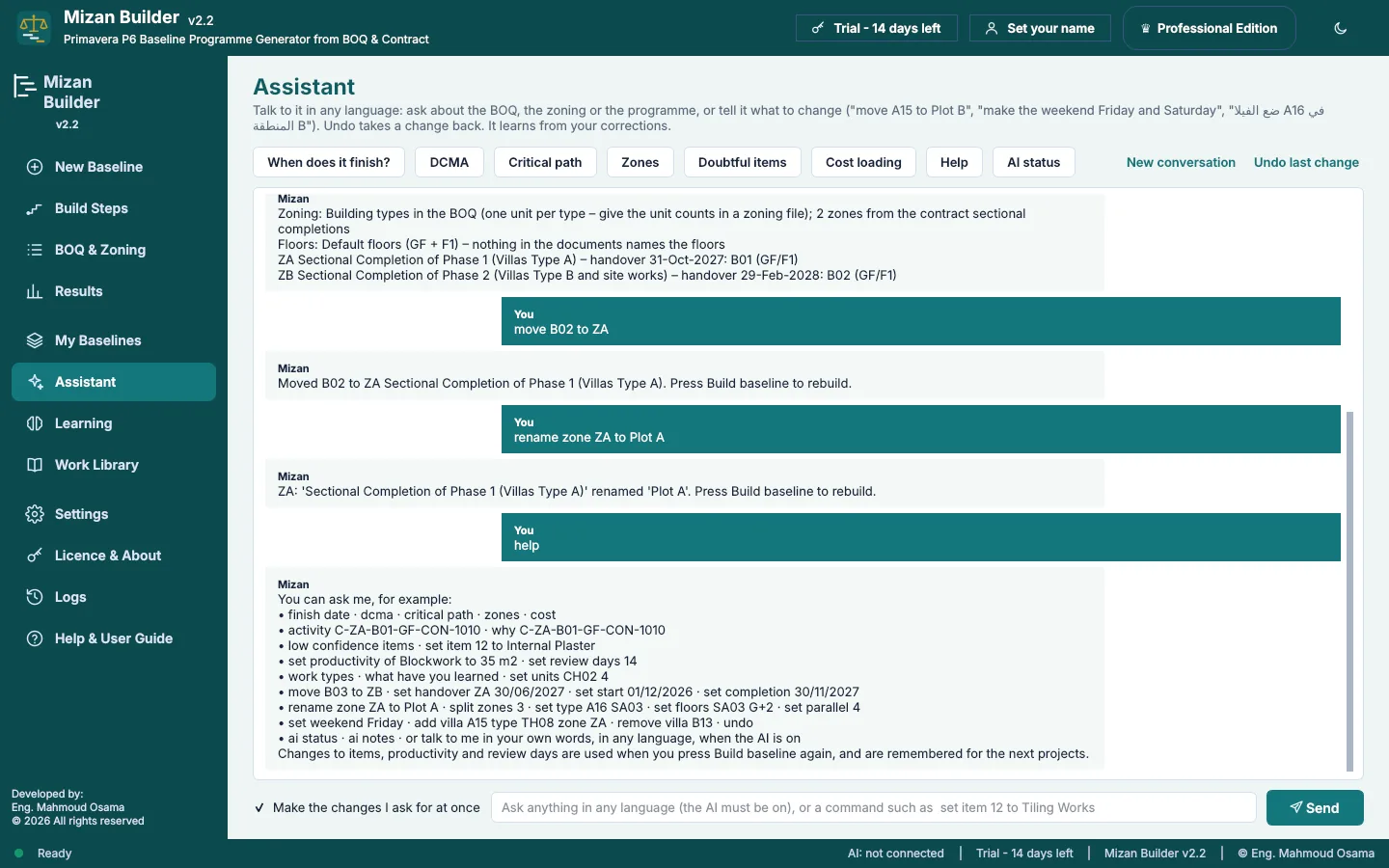
Tell it what to change.
Type a change in plain words. It is made at once, listed with a tick, and Build baseline writes a new XER with every change so far. Undo takes back the last 15.
A programme structured the way a reviewer expects it.
Detailed activities
Each BOQ item becomes its construction steps, for example reinforced concrete into formwork, steel fixing, pouring, curing and deshuttering.
Cost loading you can trace
One material resource named after the project carries the cost. Engineering, procurement, deshuttering and other non-construction activities carry none.
Calendars
A 6-day working week with Friday off and Egyptian public holidays by default. Curing and milestones run on a 7-day calendar. You can change all of it.
Activity codes
Zone, building number, type, floor, trade, BOQ division and phase, so you can group and filter in P6 straight away.
It learns
Durations come from standard productivity and from XERs you teach it. Your corrections are remembered for the next project.
Engineering and procurement
Submittal and approval levels under Engineering and Procurement, with the Engineer's review period from the Contract, or 7 days if it is silent.
Mizan Builder and Mizan Review are open for early access.
Download the full program and use it on your own projects. Every feature works for 14 days, and an e-mail gets you a free key until 31 January 2027.
- Runs on
- Windows 10 / 11, 64-bit
- Where your files go
- Nowhere. It runs on your PC
- Early access
- Free key until 31 January 2027
- Licence
- One key per PC